
LTMS ACCOUNT
Registration, Login & Password Recovery GuideLearn how to create your LTMS Portal account, sign in securely, and recover a forgotten password. Follow our simple account guides to access available LTO online services.
Forgot your password? Follow our password recovery guide
LTMSPortal.info is an independent informational website and is not affiliated with or endorsed by the Philippine Land Transportation Office (LTO).
What Is an LTMS Account?
An LTMS account is your personal online account within the Philippine Land Transportation Office’s Land Transportation Management System.
It lets you sign in to the official portal, manage available account information, and access eligible LTO digital services.
Personal Account Access
Sign in using your registered account credentials.
Account Information
View available profile details and relevant transaction information.
Account Recovery
Follow official recovery instructions if you forget your password.
LTMS Account Registration Requirements
Prepare the following information before starting your LTMS Portal account registration.
Active Email Address
Use an email address you can access to receive account verification and recovery instructions.
Mobile Number
Keep your active mobile number available for contact information and possible account notifications.
Personal Information
Prepare your correct name, birth details, address, and other information requested during registration.
Existing LTO Details
If you already hold an LTO license or other relevant records, keep the details ready when requested.
How to Register an LTMS Account
Follow these essential steps to begin registering your account on the official LTMS Portal.
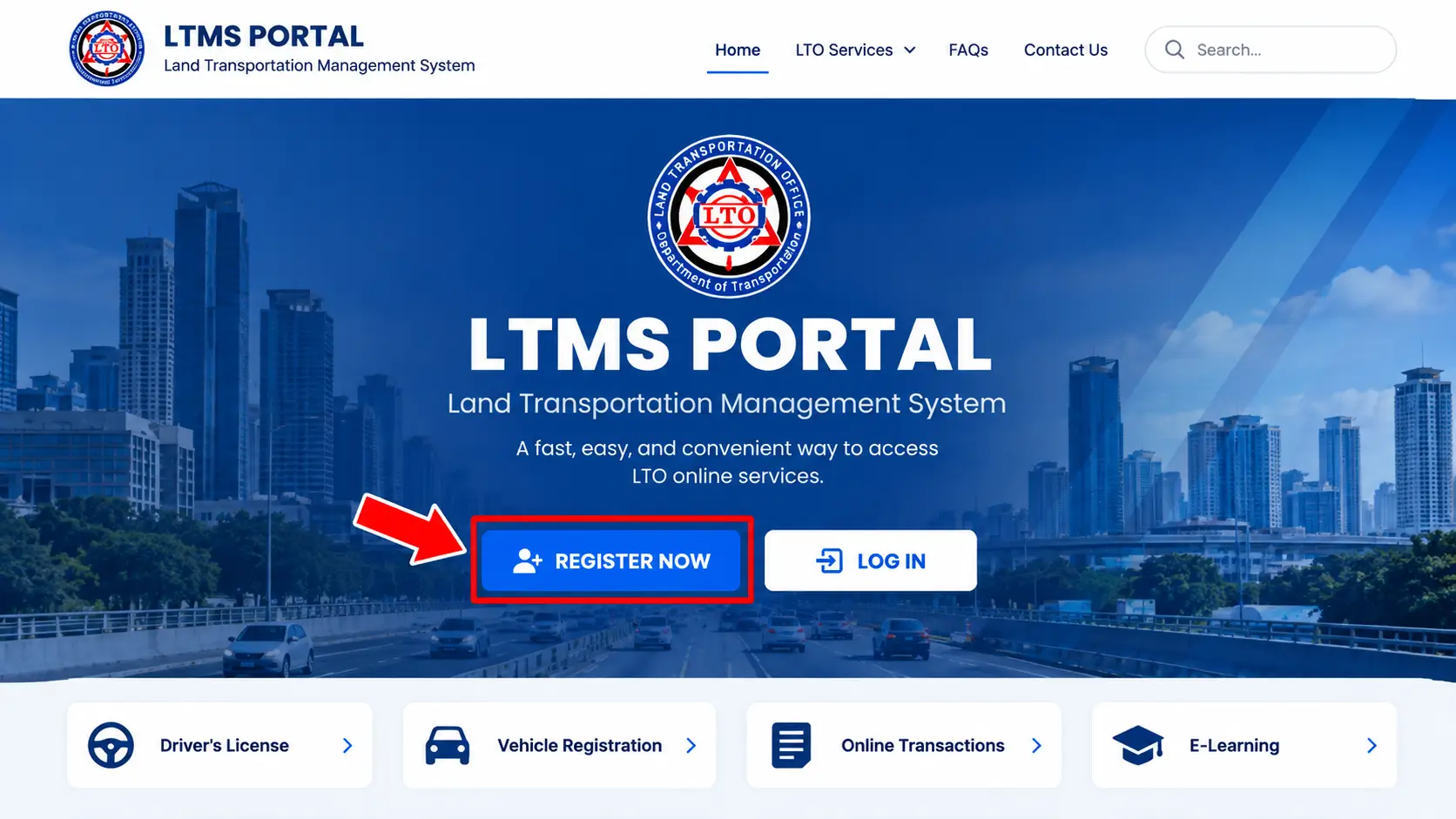
Illustrative portal interface. The live website may look different.
-
Open the LTMS Portal
Visit the official website at portal.lto.gov.ph and click Register Now.
-
Accept the Terms of Agreement
Read the terms, select Yes, I accept, enter the displayed security code, and click Next.
-
Select Your Enrollment Type
Choose Individual or Organization, depending on the account you need to create.
-
Complete the Registration Form
Provide your license status, nationality, personal details, and required contact information.
-
Create Your Account
Check the information you entered, then select Create Account to submit your registration.
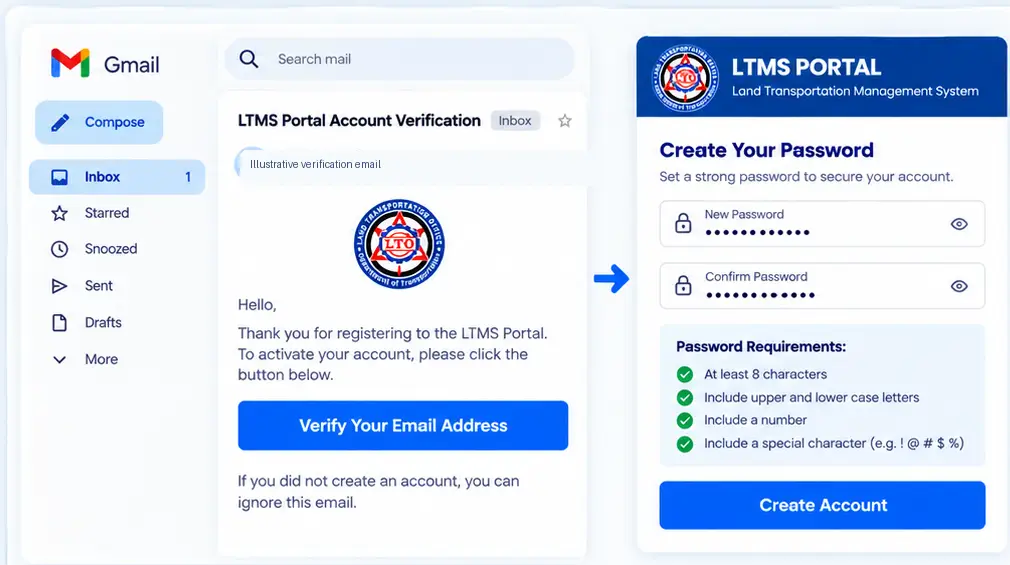
Illustrative screens only. Actual LTMS interface and email may differ.
Verify Your Email & Create Your LTMS Password
After submitting your registration, follow the official verification instructions to activate and secure your LTMS account.
-
Check Your Email
Open your registered email inbox and look for the LTMS account verification message.
-
Verify Your Email Address
Open the message and follow the official verification link.
-
Create a Secure Password
Enter a new password that meets the requirements displayed on the portal.
-
Finish Account Setup
Confirm and save your password to complete the setup process.
Security Reminder: Check your Spam or Junk folder if the verification email is missing. Never share your password or verification link.
How to Log In to Your LTMS Account
Access your registered LTMS account through the official LTO portal using these simple steps.
-
Open the Official LTMS Portal
Visit portal.lto.gov.ph and select the login option.
-
Enter Your Account Details
Enter your registered email address or LTO Client Number, as supported by the login form.
-
Complete the Security Check
Enter your password and complete the security code or CAPTCHA if displayed.
-
Sign In to Your Account
Click the login or sign-in button to access your LTMS dashboard.
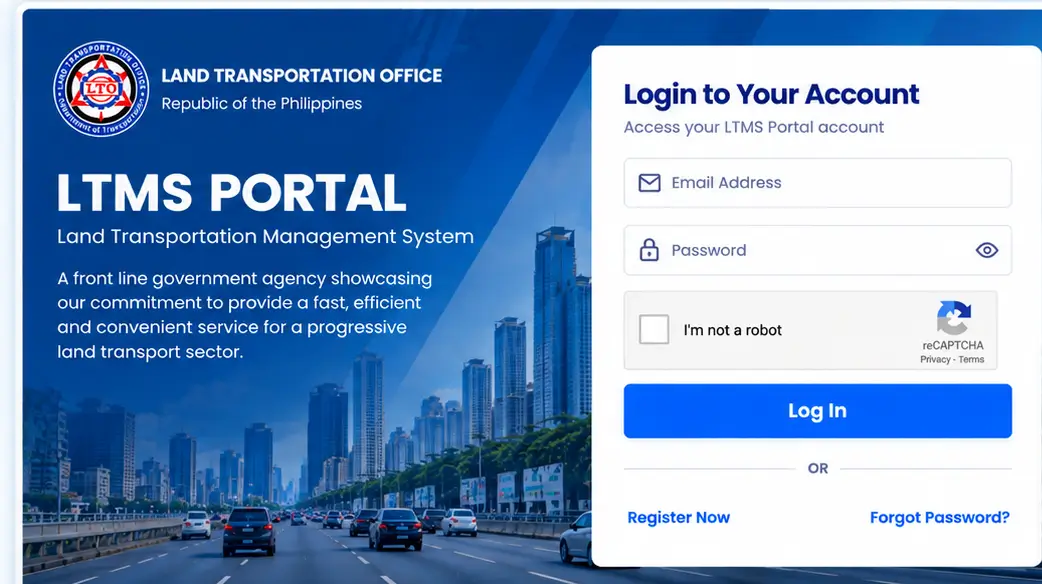
Illustrative login screen. Actual LTMS Portal layout may differ.
Common LTMS Account Problems & Solutions
Having trouble with your LTMS account? Try these simple solutions for common registration, login, and recovery issues.
Incorrect Login Details
You cannot sign in because your account details are not accepted.
Solution: Check your registered account identifier and password. Use official password recovery if necessary.
Verification Email Missing
The account verification message has not appeared in your inbox.
Solution: Check Spam or Junk folders and confirm the email entered during registration. Contact official LTO support if needed.
Forgotten Password
You no longer remember the password for your LTMS account.
Solution: Select Forgot Password on the official portal and follow the recovery instructions.
Account Already Exists
Registration indicates that an account may already be linked to your information.
Solution: Try recovering your existing account rather than creating another one. Seek official assistance if needed.
Portal Not Loading
The LTMS page loads slowly, freezes, or fails to open.
Solution: Check your internet connection, refresh the page, or try an updated browser.
Recovery Link Not Working
The password recovery link is expired, invalid, or does not open correctly.
Solution: Request a fresh recovery link through the official portal and use the latest email.
Still Having Account Problems?
If these solutions do not work, check the official LTO website for current support information. Never share passwords or verification codes.
How to Keep Your LTMS Account Secure
Follow these simple precautions to help protect your LTMS account and personal information.
Use a Strong, Unique Password
Create a password that is not used for your other accounts. Follow the official portal’s password requirements.
Check the Official Website
Enter your account details only at portal.lto.gov.ph. Be careful with links received through messages or social media.
Protect Verification Messages
Keep password reset links, verification codes, and recovery emails private. Never share them with unknown persons.
Sign Out on Shared Devices
Always sign out after using LTMS on a shared computer. Avoid saving your password in public browsers.
Security Reminder: If you suspect unauthorized account access, change your password using the official recovery process and contact LTO through official channels. Visit portal.lto.gov.ph
LTMS Account Frequently Asked Questions
Find answers to common questions about LTMS account registration, verification, login, and recovery.
Can I create an LTMS account without a driver’s license?
Yes. Applicants who do not yet have a driver’s license can register by following the applicable enrollment options on the official portal.
Can I use the same email for multiple LTMS accounts?
Use your own accessible email address when registering. If the portal indicates an email is already registered, recover the existing account or contact official LTO support.
What should I do after submitting my registration?
Check your registered email for the verification message. Follow the instructions to verify your account and complete password setup.
Can I register an LTMS account using my mobile phone?
You can access the official LTMS website using a compatible mobile browser. The registration form may be easier to complete on a larger screen.
Do I need a new LTMS account for every LTO transaction?
No. Your existing account is intended for accessing eligible services and transactions. Use your current account rather than registering again.
Can I update my LTMS account information?
Some account information may be viewable or editable through the portal. Changes to certain official records may require additional LTO verification.
What if my registered email address is no longer accessible?
Contact official LTO support for guidance on account recovery or updating your registered contact details. Do not create duplicate accounts without guidance.
Can someone else register an LTMS account for me?
Your LTMS account contains personal information. If someone assists with registration, keep control of your email, password, and verification messages.
What happens if I forget my LTO Client Number?
Check your available LTMS account records or use another supported login identifier. If you cannot locate your Client Number, seek help through official LTO channels.
Where should I enter my LTMS login credentials?
Enter your credentials only through the portal.lto.gov.ph LTMSPortal.info is an independent informational guide and does not collect account passwords.
Ready to Access Your LTMS Account?
Visit the official LTMS Portal to create an account or sign in securely. Use the guides above if you need help with registration, email verification, or password recovery.
Forgot your password? Follow the Password Recovery Guide
Security Reminder: Enter your login credentials only at portal.lto.gov.ph.
Disclaimer: LTMSPortal.info is an independent informational website and is not affiliated with, endorsed by, or officially connected to the Philippine Land Transportation Office (LTO). We do not process government transactions or collect LTMS passwords.