
LTMS PORTAL
Your Complete Guide to LTO Online ServicesNavigate LTMS Portal services with confidence. Explore step-by-step guides for account registration, login, driver’s license applications, vehicle registration, online learning, and traffic violations in the Philippines.
Need help getting started? Follow our registration guide
LTMSPortal.info is an independent informational website and is not affiliated with or endorsed by the Philippine Land Transportation Office (LTO).
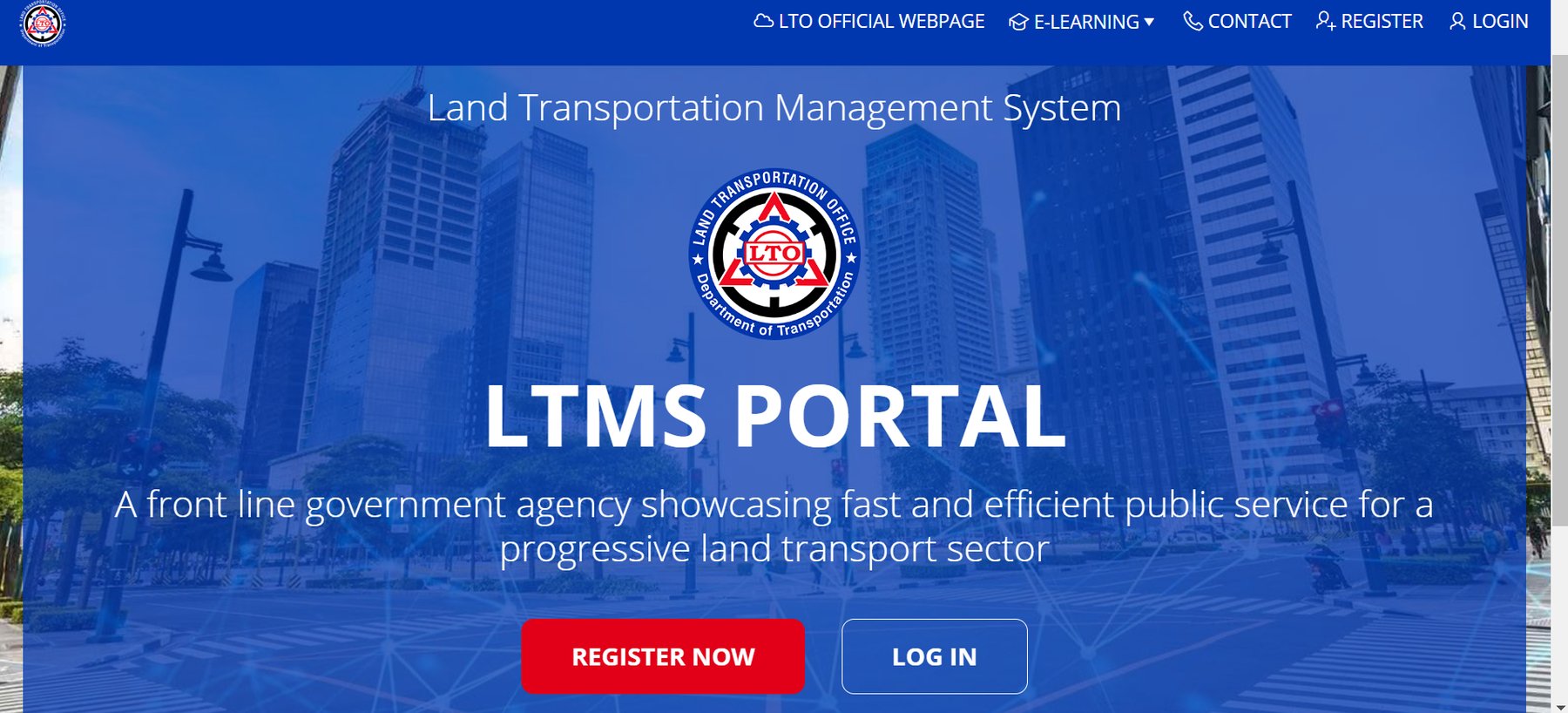
Historical LTMS Portal screenshot. The current interface may look different.
Open the Official LTMS Portal and Click Register Now
Visit portal.lto.gov.ph and make sure you are on the official government website. On the homepage, click the REGISTER NOW button to begin creating your LTMS account.
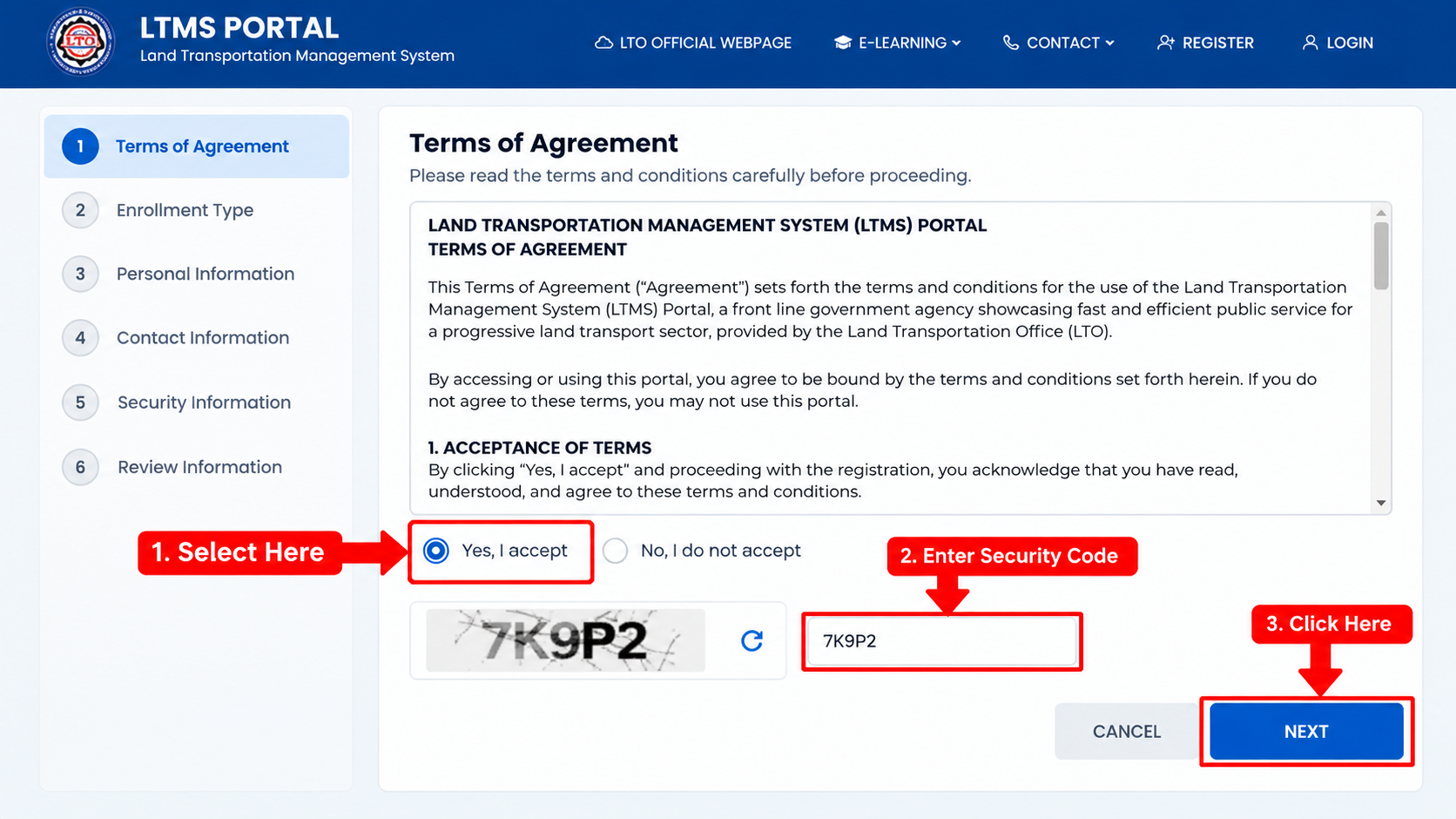
Read and Accept the LTMS Terms of Agreement
Carefully read the Terms of Agreement. If you agree, select Yes, I accept.
Enter the security code displayed on your screen, then click the NEXT button to continue your registration.
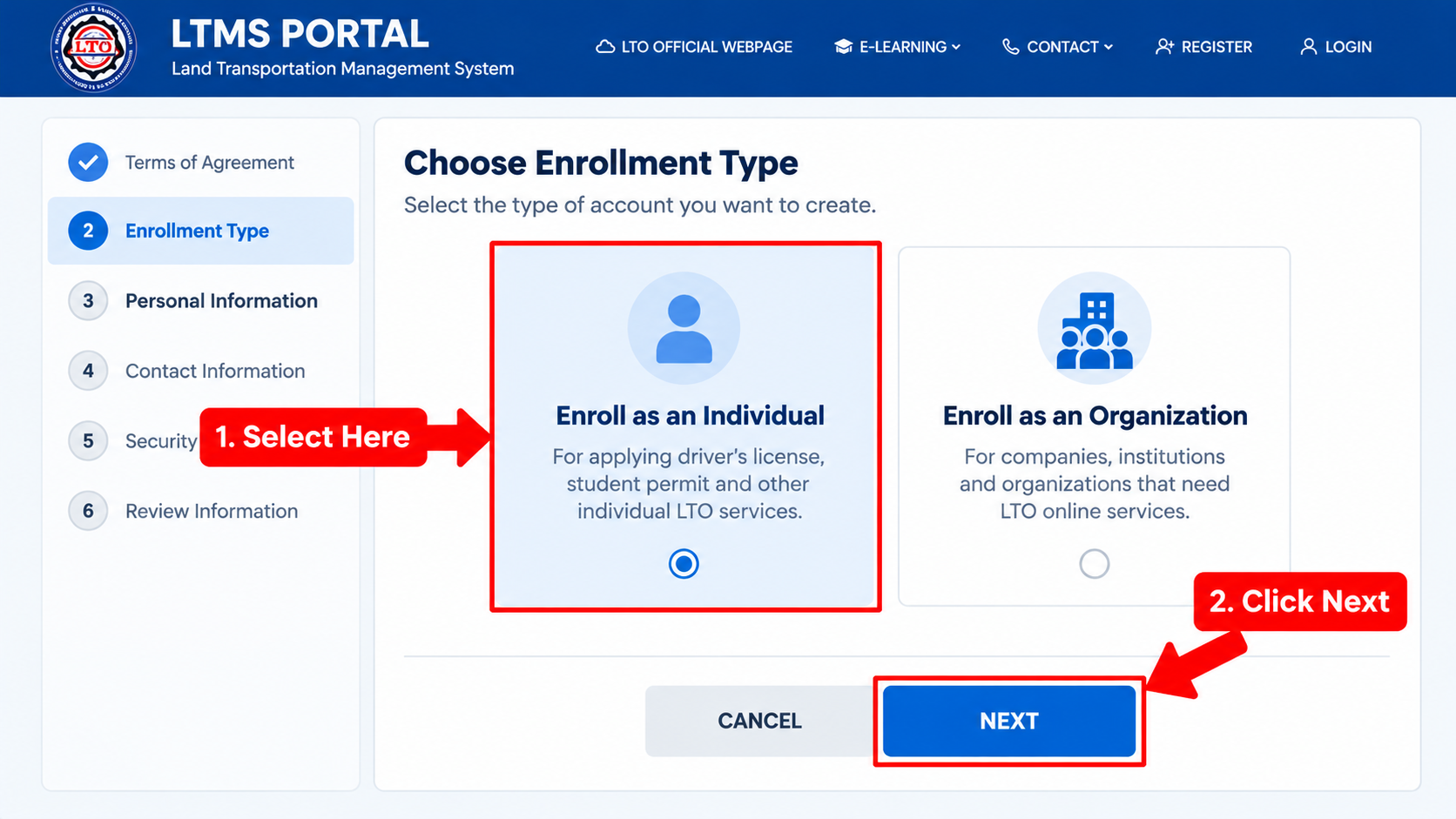
Select Your LTMS Enrollment Type
Choose Enroll as an Individual if you are registering for personal LTO services, including driver’s license applications and student permits.
If you represent a company or organization, choose Enroll as an Organization instead. Follow the instructions displayed for your selected account type.
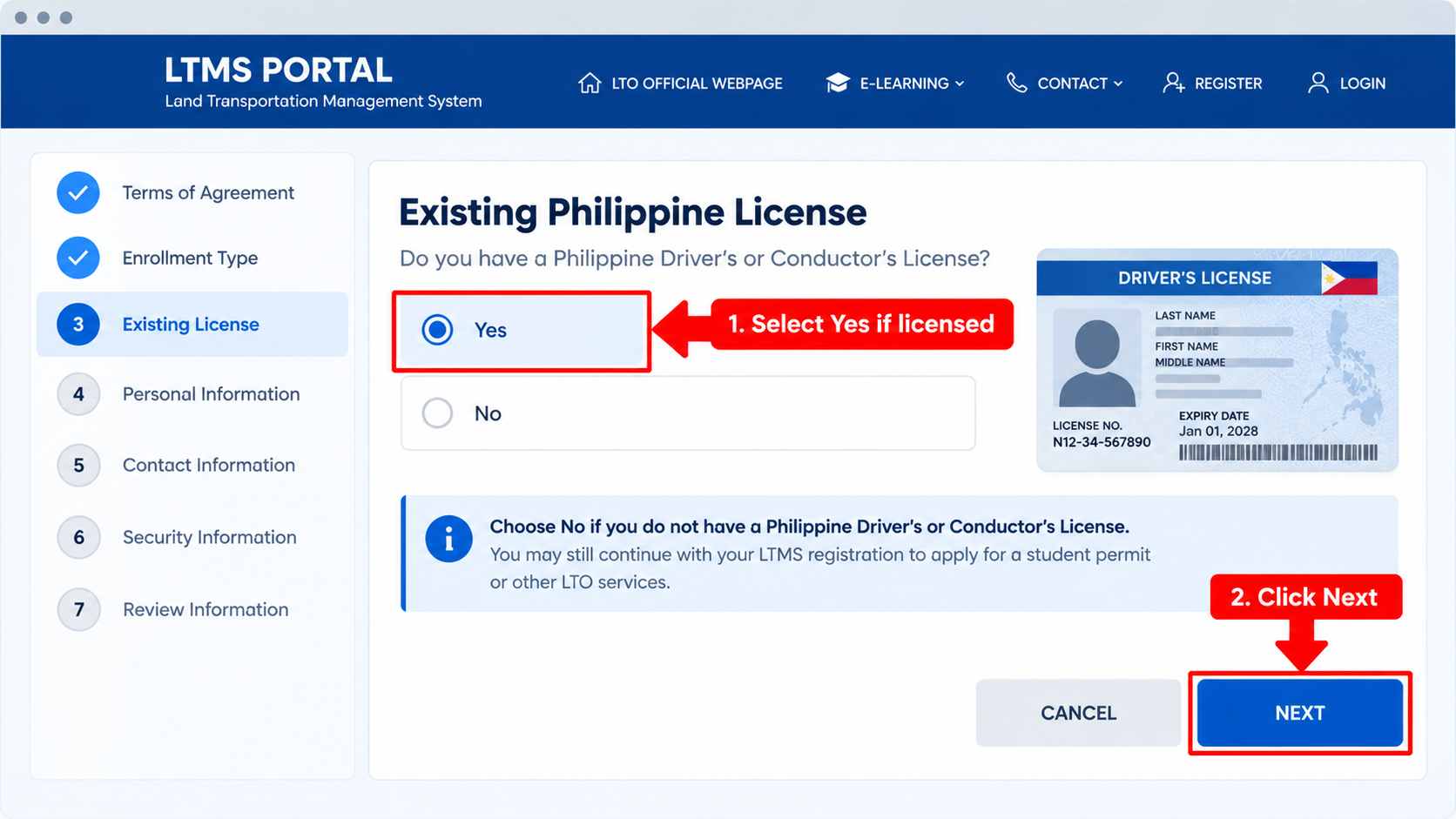
Do You Have an Existing Philippine Driver’s or Conductor’s License?
Select Yes if you already have a Philippine driver’s or conductor’s license. Follow the instructions to enter your existing license details.
If you do not have a license yet, select No, then click Next to continue your registration.
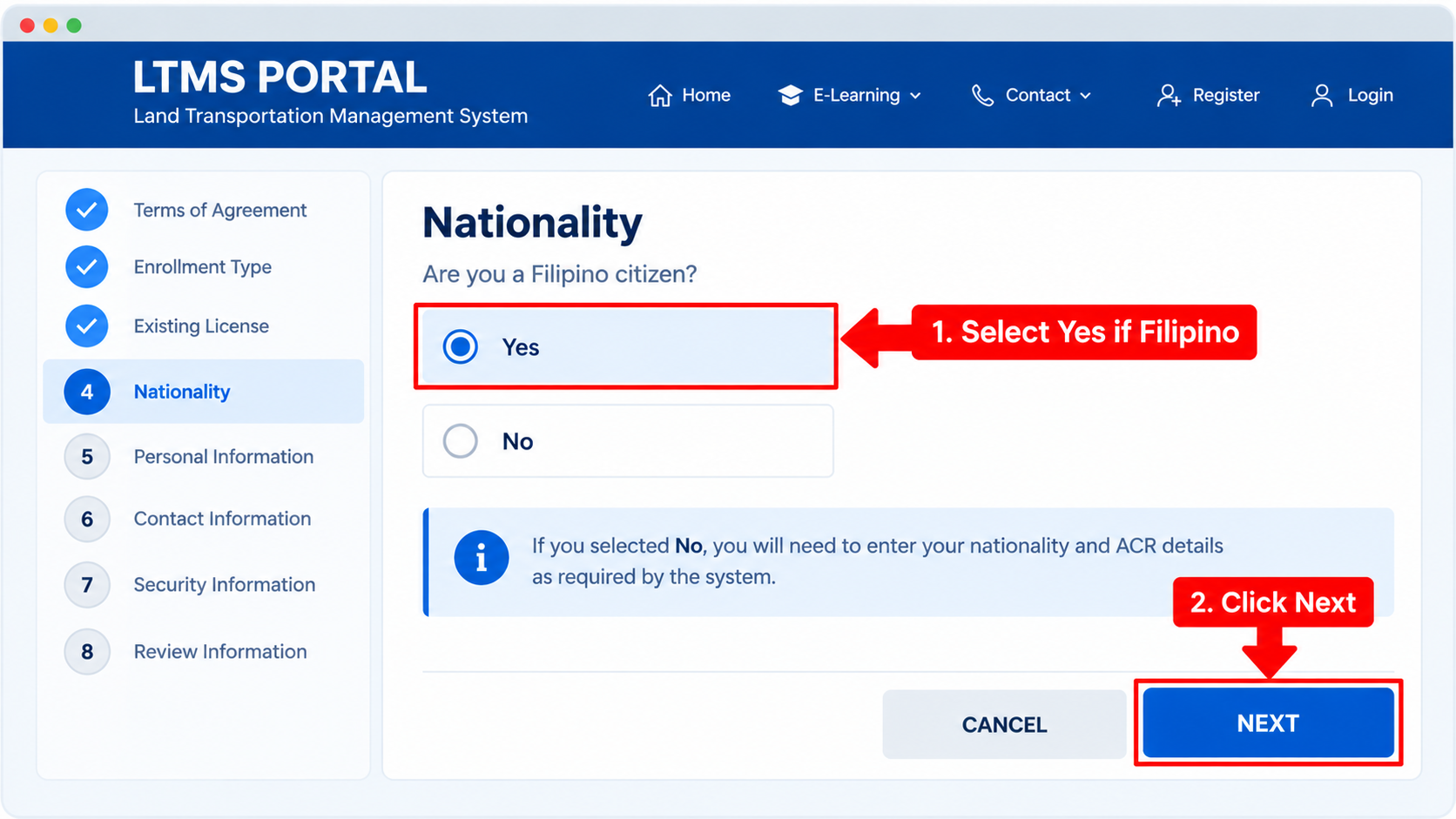
Confirm Your Nationality
The LTMS Portal will ask whether you are a Filipino citizen. Select Yes if you are Filipino, then click Next.
If you are a foreign national, select No and provide the requested nationality and Alien Certificate of Registration (ACR) details, where applicable.
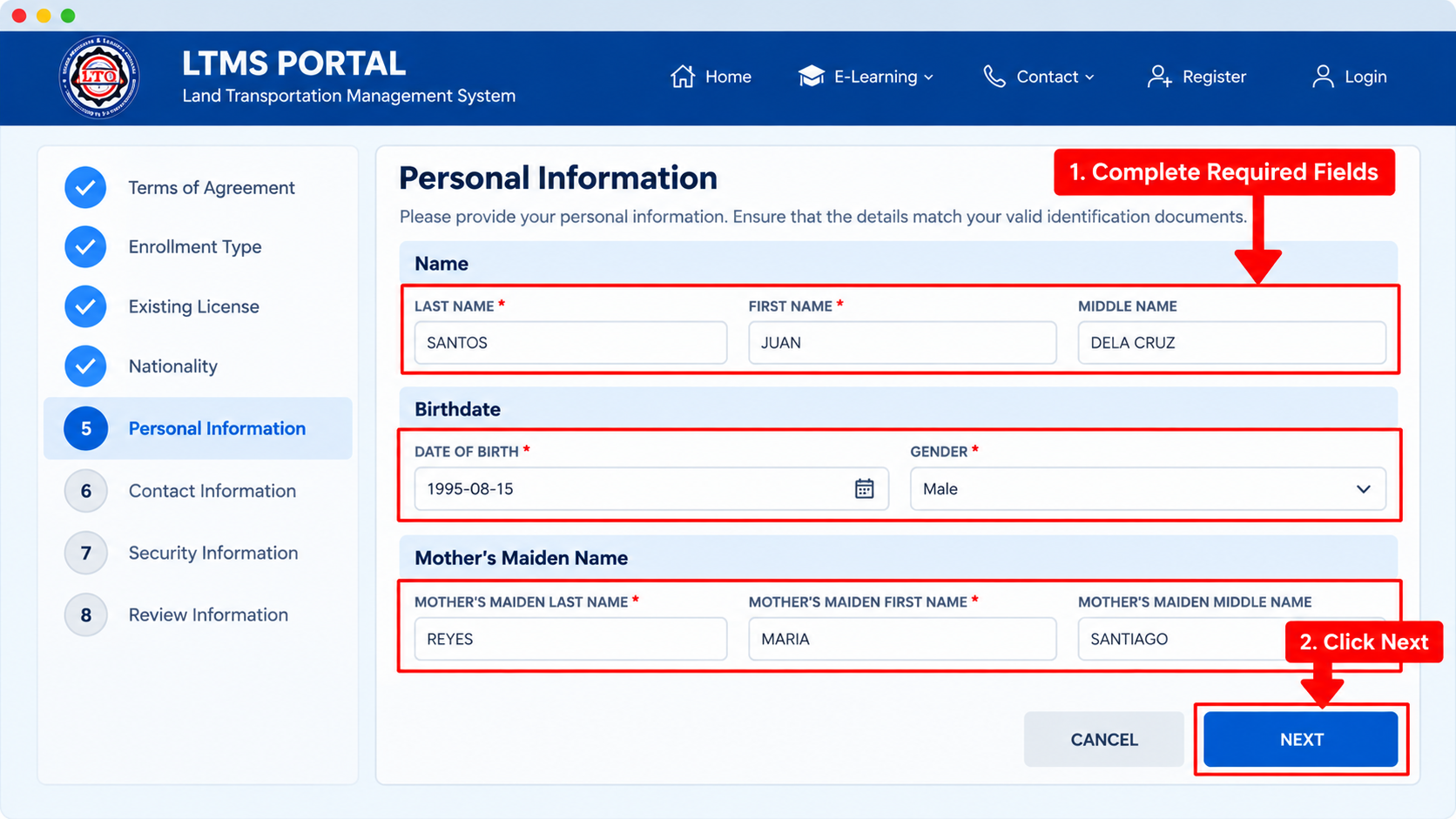
Enter Your Personal Information
Enter your last name, first name, middle name, date of birth, gender and mother’s maiden name as requested by the LTMS Portal.
If you have an existing LTO license, some information may already be filled in. Review everything carefully, then click Next to continue.
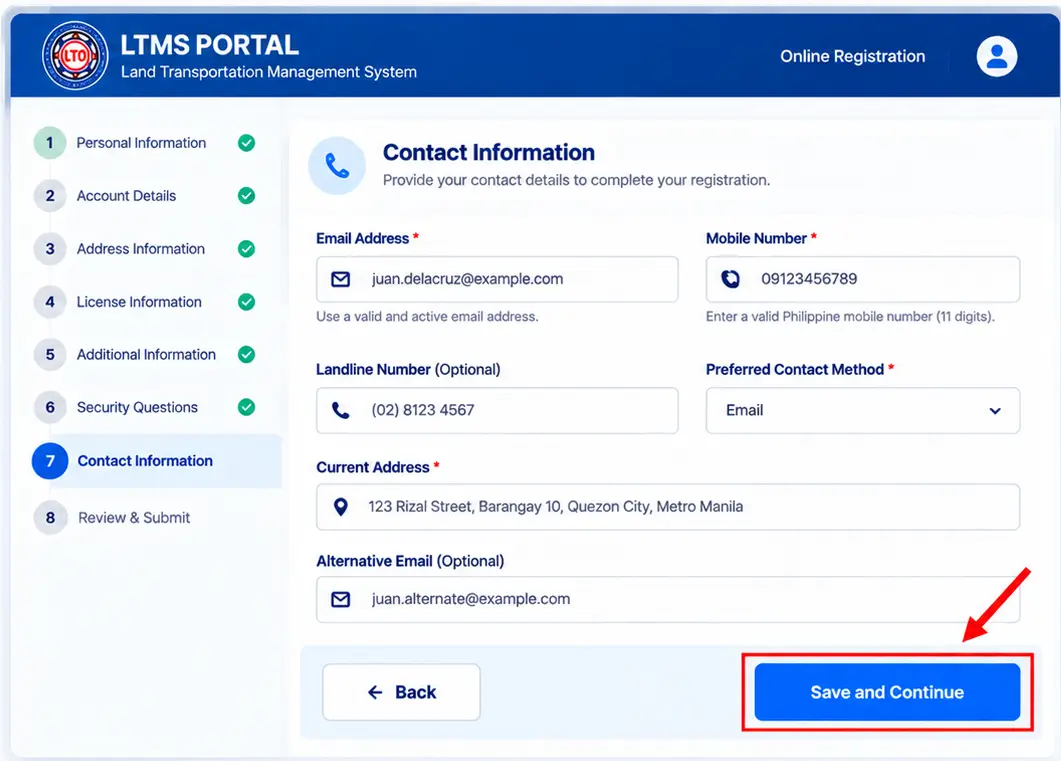
Illustrative registration form. Actual LTMS fields may differ.
Enter Your LTMS Contact Information
Provide accurate contact details during your LTMS Portal registration so you can receive important account-related communications.
- Enter an active email address that you can access.
- Provide your mobile phone number and any other contact details requested by the portal.
- Complete additional required contact fields, if displayed.
- Review your information and proceed using the button shown on the official form.
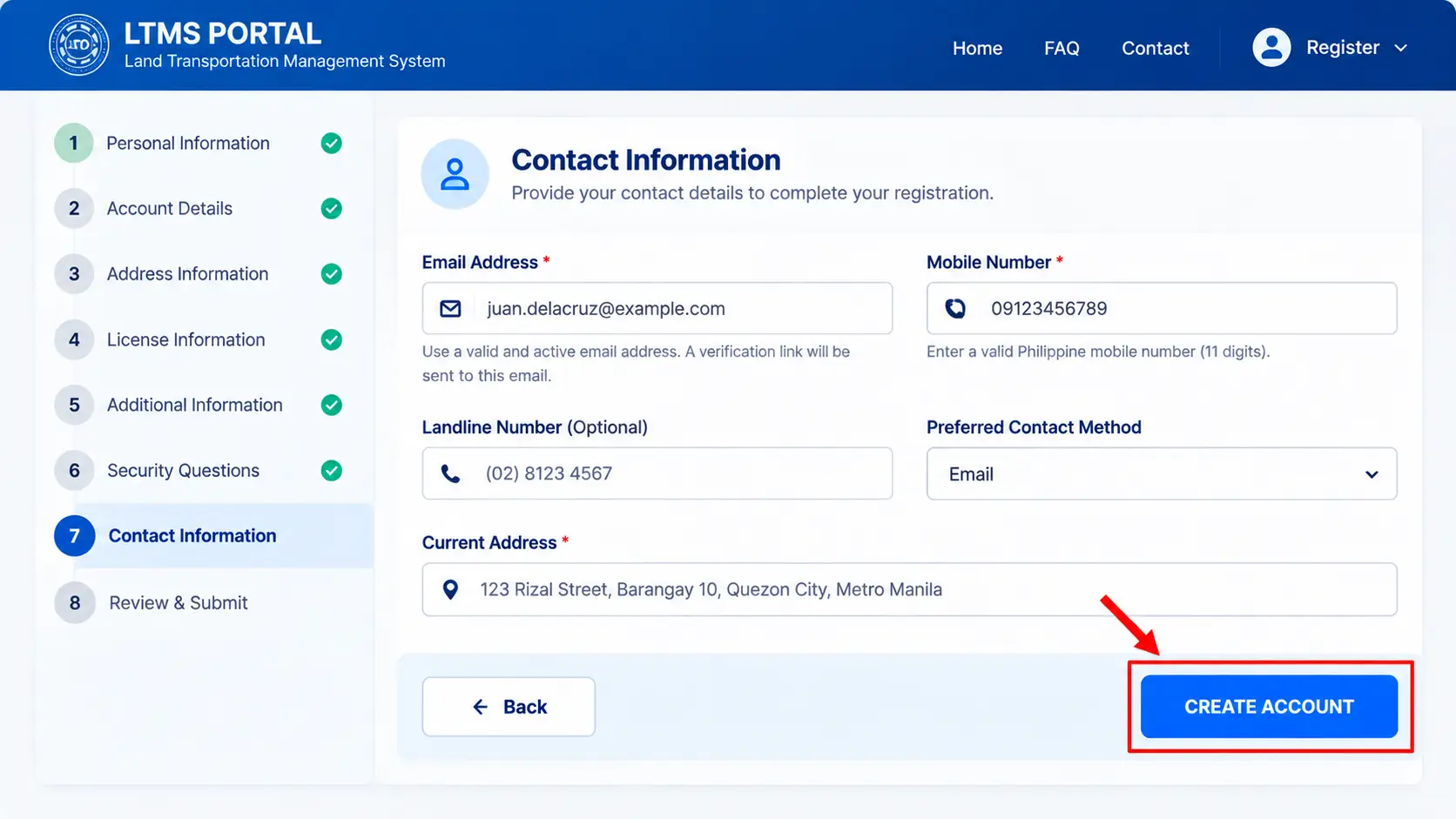
Illustrative registration screen. The live LTMS interface may differ.
Complete & Submit Your LTMS Registration
After entering your Contact Information, review your email address, mobile number, and other required registration details.
Once everything is correct, click Create Account to submit your LTMS registration.
Follow the confirmation instructions displayed on the portal and check your registered email for the next step.
Verify Your LTMS Email Address
After submitting your LTMS registration, check your registered email address for account verification instructions.
- Open the inbox of your registered email address.
- Look for the account verification email from the LTMS Portal.
- Open the email and follow its verification link.
- Once verified, continue to the password setup process.
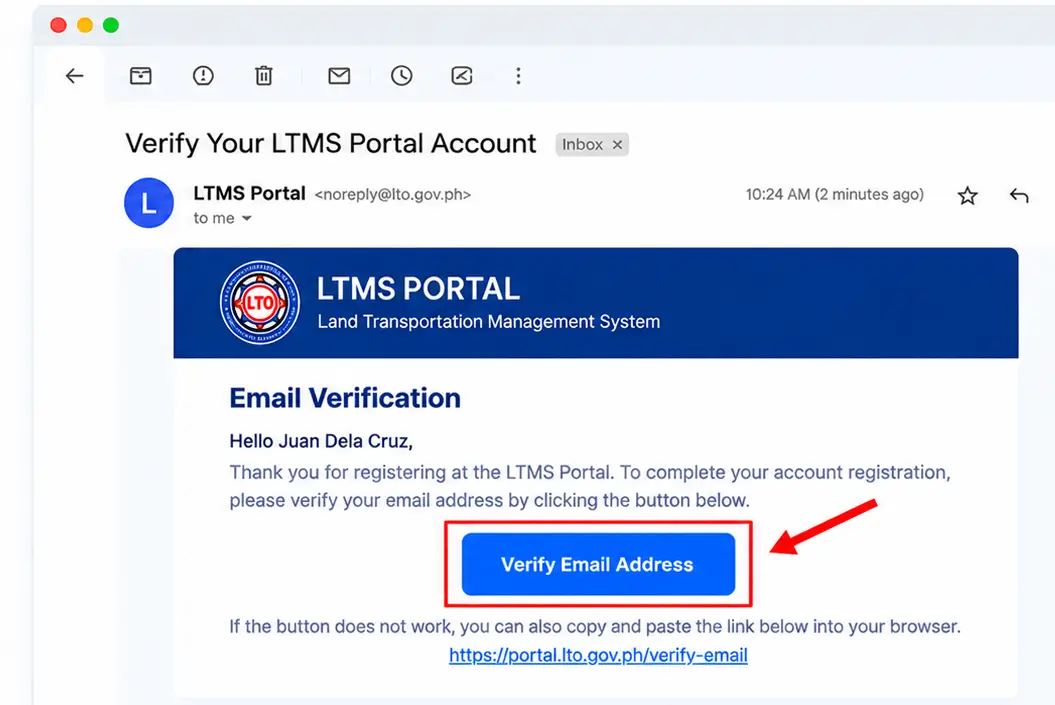
Illustrative email verification screen. Actual LTMS email design may differ.
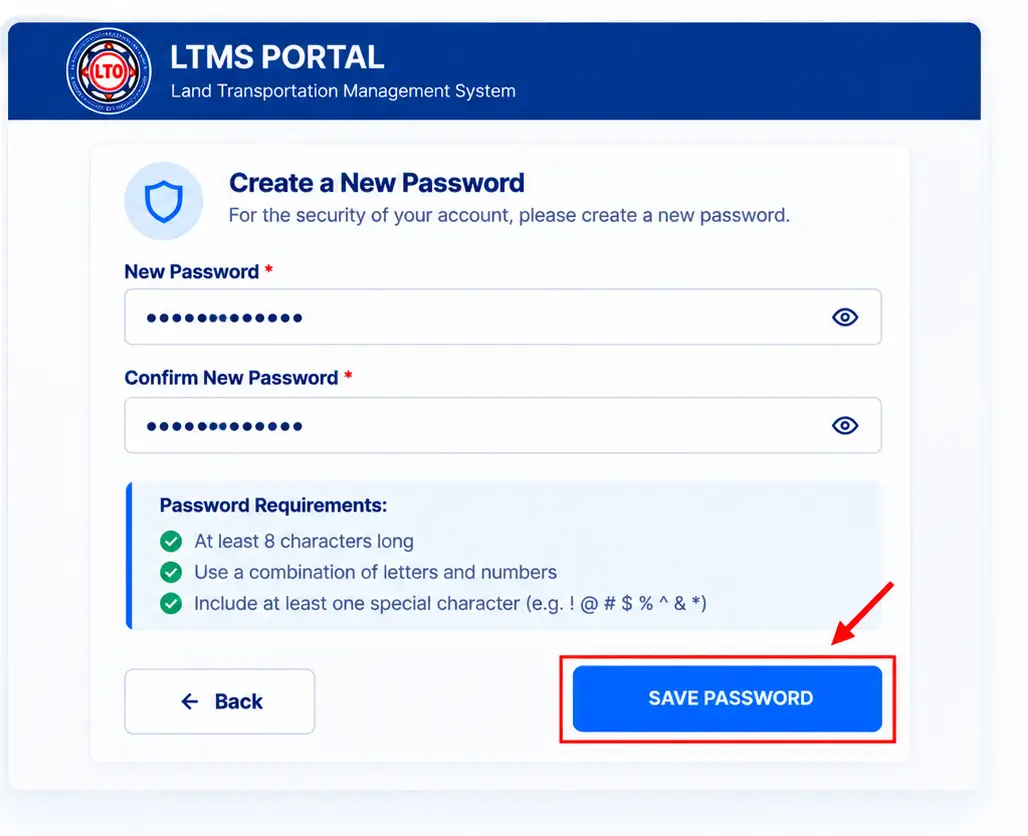
Illustrative password setup screen. Actual portal layout may differ.
Create Your LTMS Account Password
After verifying your registered email address, follow the password setup instructions to secure your LTMS account.
- Enter a new, strong password in the required field.
- Type the same password again in the confirmation field, if requested.
- Follow the password requirements displayed on the official portal.
- Save your password using the available confirmation button.
Log In to Your LTMS Portal Account
After setting your password, open the official LTMS Portal and sign in using your registered account credentials.
- Open the official LTMS Portal login page.
- Enter your registered email address or LTO Client Number, as supported.
- Type your password and complete the security code or CAPTCHA, if displayed.
- Click Log In to access your account.
Illustrative login screen. Actual official portal design may differ.
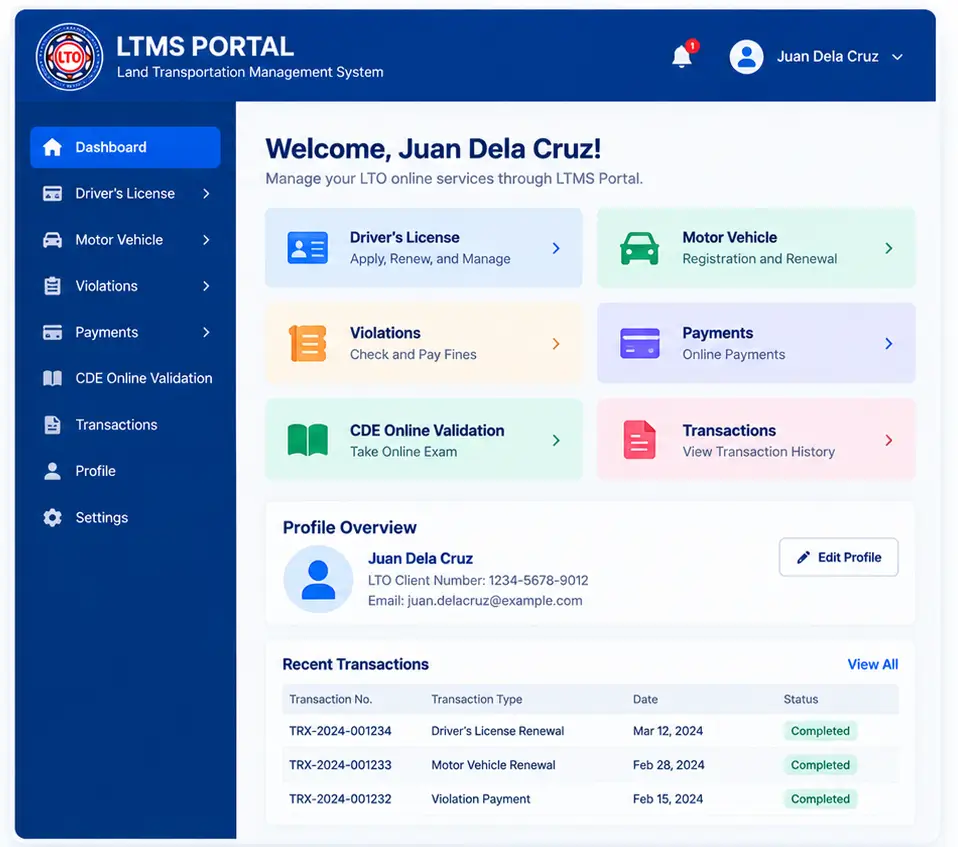
Illustrative dashboard. Actual LTMS options may differ.
Explore Your LTMS Portal Dashboard
After successfully logging in, you can explore your LTMS account dashboard and access available LTO online services.
- Sign in to your LTMS account to open your dashboard.
- Explore available services such as Driver’s License, Motor Vehicle, and E-Learning.
- Choose the relevant service to view its instructions or begin an eligible transaction.
- Review your available account details and transaction records.
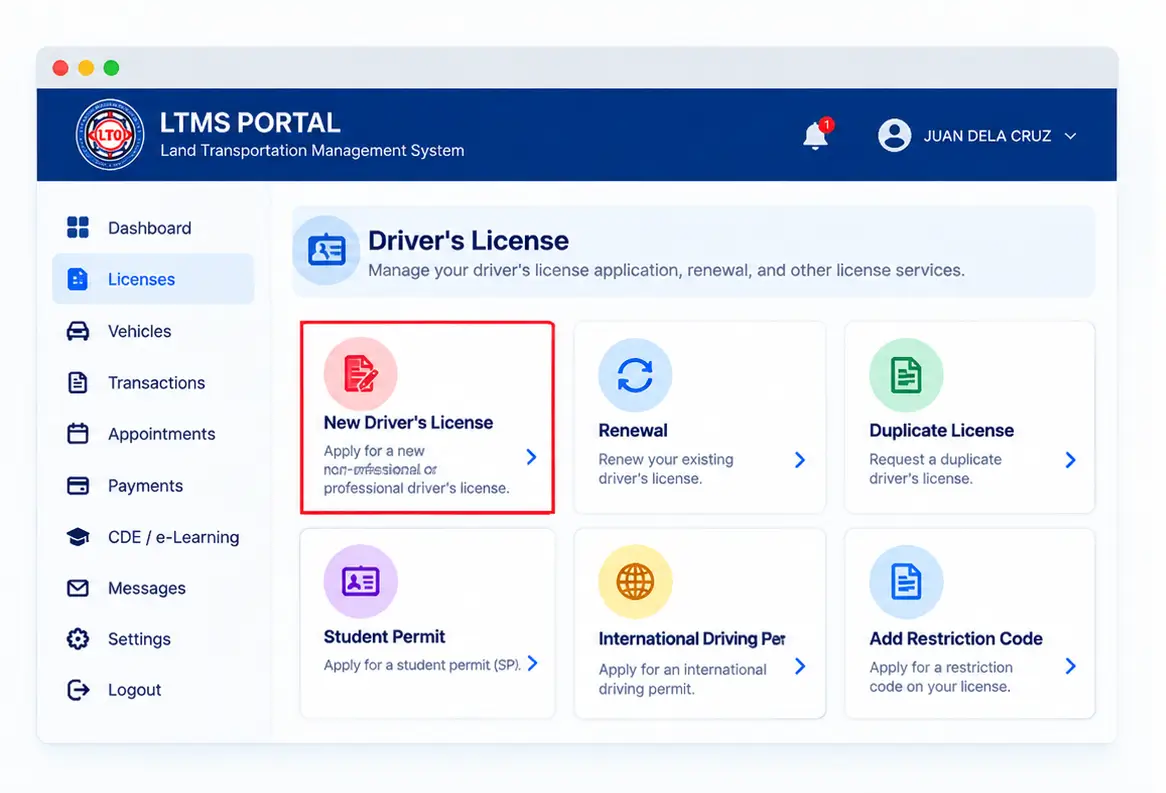
Explore Driver’s License Services on LTMS Portal
The LTMS Portal helps eligible motorists access licensing-related services and information. Sign in to your account and review the available Driver’s License options.
Important licensing services include:
- Student Permit Applications
- New Driver’s License Applications
- Driver’s License Renewal
- Duplicate or Replacement License
- Additional Driver’s License Codes
Choose the relevant service and follow the current LTO instructions for requirements, examinations, appointments, and applicable fees.
Explore Motor Vehicle Registration & Renewal Services
The LTMS Portal provides access to eligible Motor Vehicle Services and registration-related information. You can review available options for vehicle registration, renewal, and record-related transactions.
- Log in to your official LTMS Portal account.
- Open the available Vehicle Services or motor vehicle menu.
- Select the applicable transaction, such as Registration Renewal, if available for your vehicle.
- Review the requirements, provide the requested information, and follow the official LTO instructions.
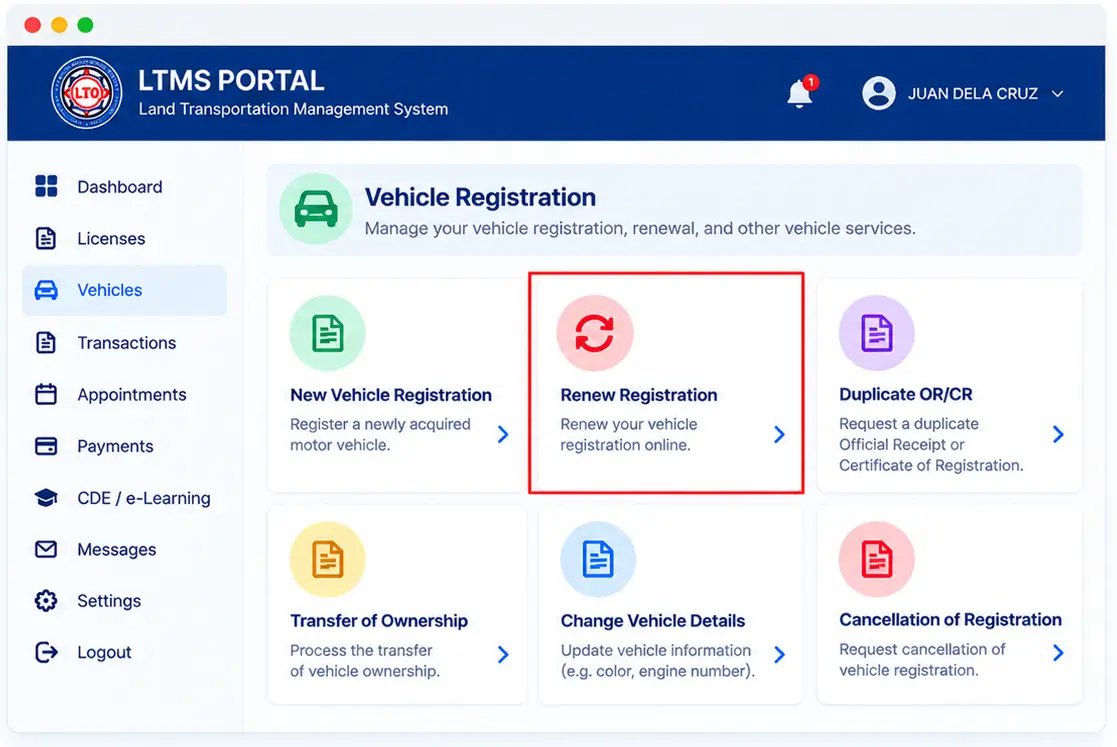
Illustrative vehicle services interface. Actual LTMS options may differ.
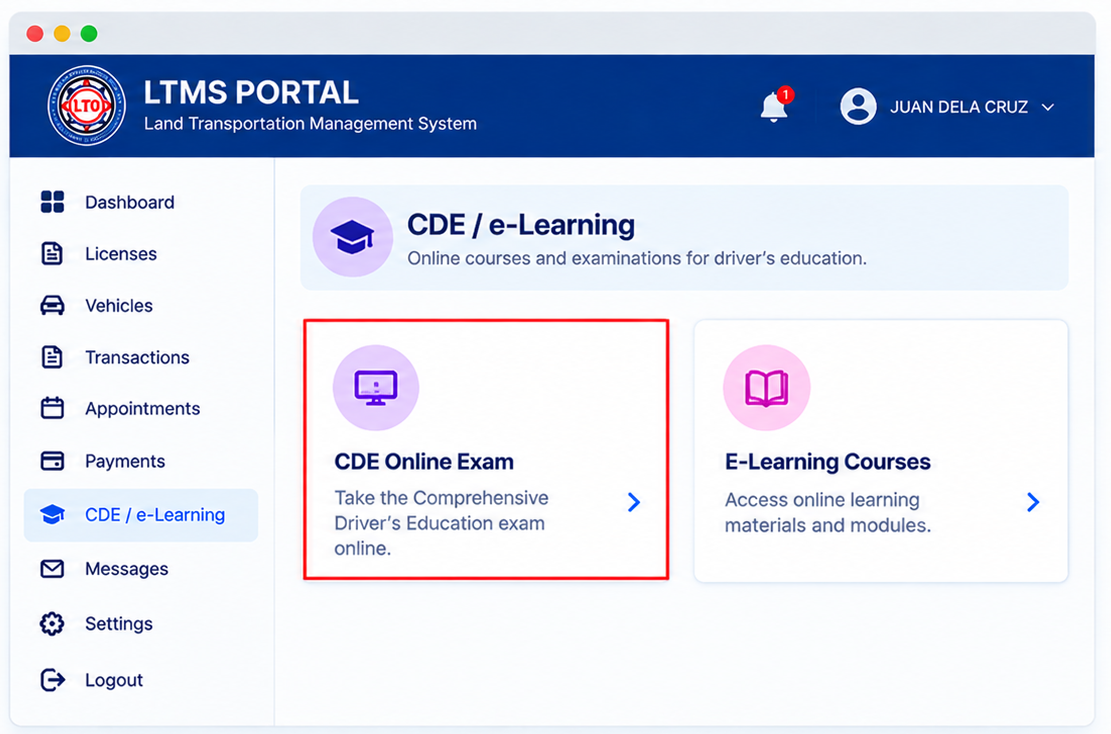
Explore LTMS E-Learning & CDE Online Exam
The LTMS E-Learning Portal provides driver education materials, road safety lessons, and the CDE Online Validation Exam.
Visit the official portal, open E-Learning, and select the course or examination you need.
Check Traffic Violations, Fines & Demerit Points
The LTMS Portal helps motorists access available traffic violation information, applicable penalties, and driver demerit point records.
- Log in to your official LTMS account.
- Check the available Violations or Transactions options.
- Review any violation records, fines, or demerit points displayed.
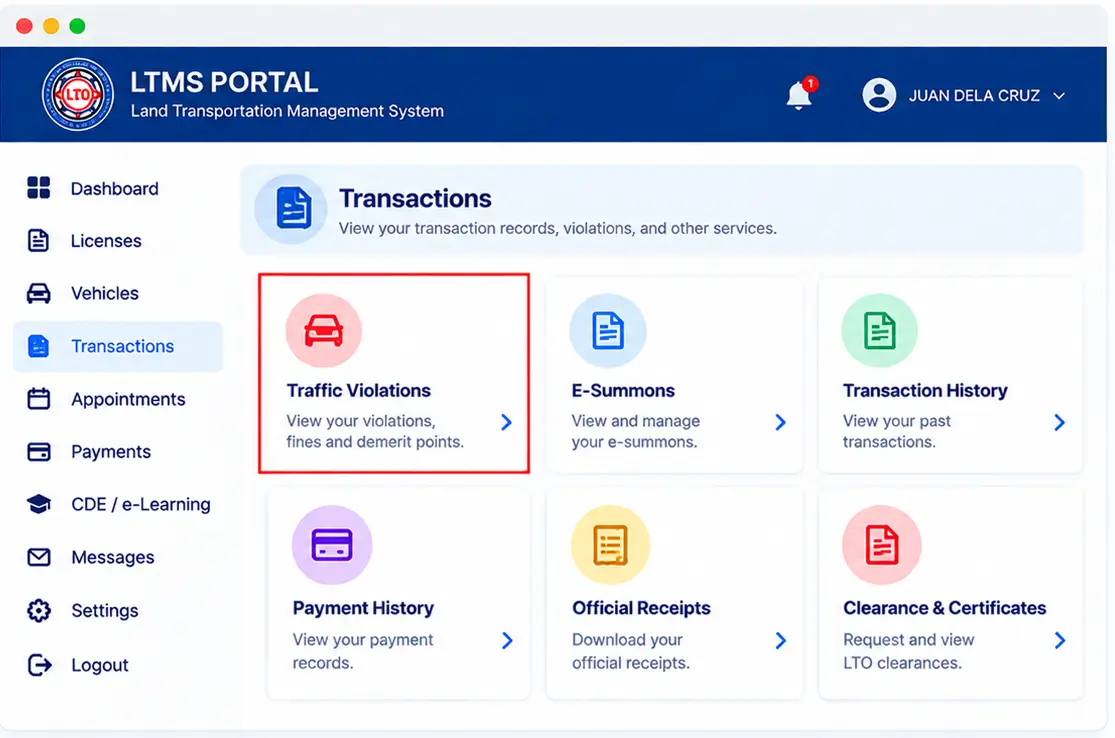
Illustrative screen. Actual LTMS options may differ.
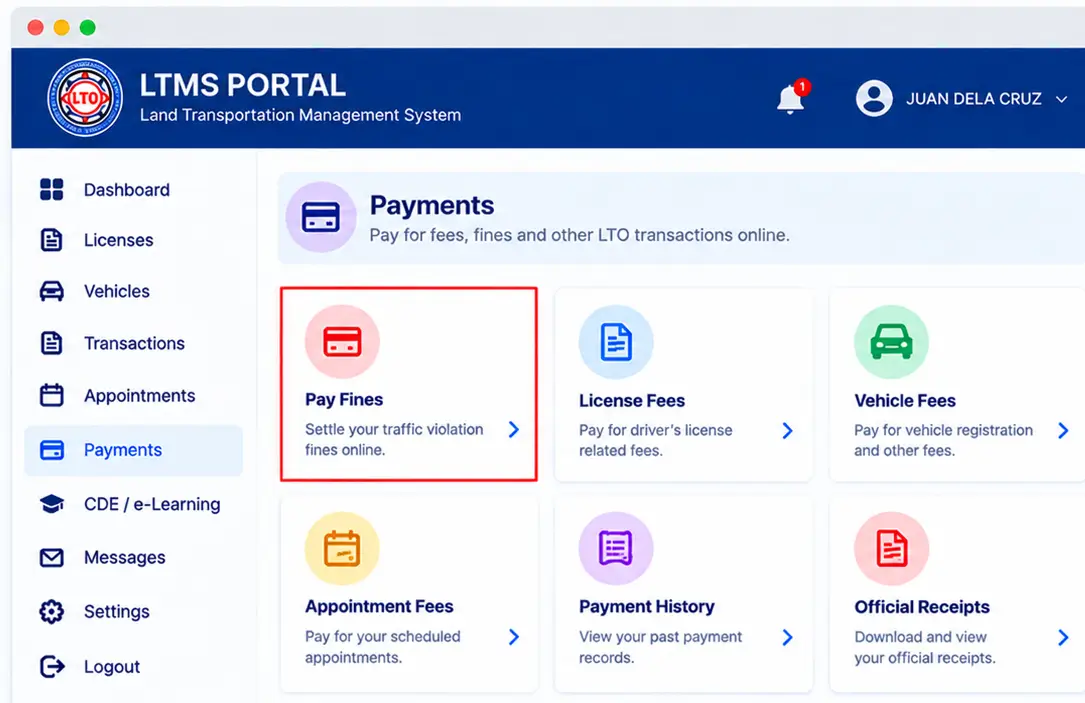
Illustrative payment interface. Actual LTMS options may differ.
LTMS Portal Payments, Fees & Transactions
The LTMS Portal provides payment options for eligible LTO transactions, including applicable licensing and vehicle fees.
- Log in to your official LTMS account.
- Open the relevant transaction and review its payment instructions.
- Select an available official payment method.
- Complete the payment and save your confirmation or receipt.
Solve Common LTMS Portal Login & Account Problems
Facing problems with LTMS Portal login, password recovery, or account access? Try these simple troubleshooting steps.
- Check your internet connection and refresh the official portal.
- Verify your registered email, LTO Client Number and password.
- Select Forgot Password if you cannot access your account.
- Clear your browser cache or try another updated browser.
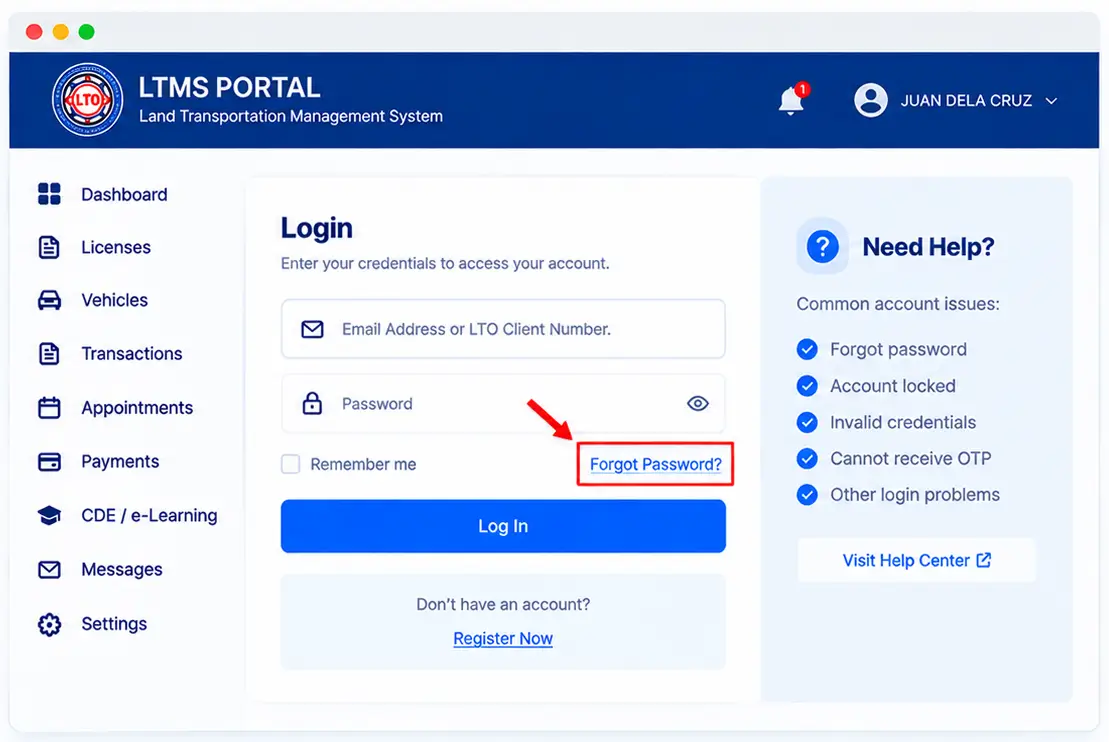
Illustrative recovery screen. Actual portal layout may differ.
Why Use the LTMS Portal?
The LTMS Portal makes it easier to access available LTO services, manage account information, and explore helpful transportation resources online.
Save Time
Access eligible LTO services online and reduce unnecessary office visits.
Convenient Access
Explore available services and account information through one online platform.
Service Information
Find useful licensing and vehicle-related information in one place.
Online Learning
Explore driver education materials, road safety lessons, and CDE resources.
LTMS Portal – Frequently Asked Questions
Find quick answers about LTMS Portal registration, login, driver’s licenses, vehicle services, online learning, and account support.
1. What is the LTMS Portal?
LTMS stands for Land Transportation Management System. It is an online platform operated by the Philippine Land Transportation Office (LTO).
2. What is the official LTMS Portal website?
The official government portal is portal.lto.gov.ph.
3. How do I register for an LTMS account?
Visit the official portal, select Register Now, complete the required information, and follow the account verification instructions.
4. Is LTMS account registration free?
Creating an LTMS account is free. Fees may apply to specific LTO transactions and services.
5. How can I log in to my LTMS account?
Enter your registered email address or LTO Client Number, password, and the required security code on the official login page.
6. What is an LTO Client Number?
An LTO Client Number is an identifier associated with your LTMS account. It can be used for account access where supported by the portal.
7. How do I reset my LTMS password?
Use the Forgot Password option on the official login page and follow the recovery instructions provided.
8. Do I need to verify my email address?
Email verification may be required during account activation. Follow the verification instructions sent to your registered email address.
9. Can I apply for a driver’s license through LTMS?
LTMS supports eligible licensing transactions. Medical examinations, tests, document checks, or office visits may still be required.
10. Can I renew my driver’s license online?
LTMS provides renewal-related services. The full process and required in-person steps depend on current LTO rules.
11. Can I apply for a student permit through LTMS?
LTMS provides information and processes for eligible student permit applications. Check the current LTO eligibility and document requirements.
12. What is the CDE Online Validation Exam?
The CDE Online Validation Exam assesses driving knowledge and is associated with driver’s license renewal requirements.
13. Where can I access LTMS E-Learning?
Visit the official LTMS Portal and open the E-Learning area to review available road safety and driver education materials.
14. Can I renew vehicle registration using LTMS?
Eligible vehicle renewal services may be available through LTMS. Inspection, insurance, or other requirements may still apply.
15. Can I check traffic violations online?
Depending on the available LTMS features and your records, you may be able to review violation information through your account.
16. What are LTO demerit points?
Demerit points are assigned for certain traffic violations under the applicable LTO rules and can affect driving privileges.
17. Can I pay LTO fees online?
Some eligible transactions offer official online payment options. Review the payment instructions for your specific transaction.
18. Why is my LTMS Portal account not working?
Check your credentials, internet connection, and browser. If you still cannot log in, use official recovery or LTO support channels.
19. Can I use the LTMS Portal on mobile?
The portal can be accessed through a compatible mobile browser, although some features may be easier to use on a computer.
20. Is LTMSPortal.info an official LTO website?
No. LTMSPortal.info is an independent informational guide and is not affiliated with or endorsed by the Philippine LTO.
Ready to Access LTMS Online Services?
Visit the official LTMS Portal to sign in, register an account, or explore available LTO online services. Use our step-by-step guides to understand the process before starting your transaction.
Disclaimer: LTMSPortal.info is an independent informational website. We are not affiliated with, endorsed by, or officially connected to the Philippine Land Transportation Office (LTO). We do not process government transactions or collect LTMS login credentials.